Sindh Job Portal: SJP Login Online Registration

Sindh Job Portal SJP login and online registration at sjp.gos.pk. Learn how to apply for BPS-5 to BPS-15 Sindh government jobs 2025, check eligibility, salary structure, and track your application. Step-by-step registration process for Sindh Police, Health, Education Department jobs.
Landing a government job in Sindh represents a pinnacle of career stability and service for many. For years, the process was tangled in complexity. Today, the Sindh Job Portal (SJP) at sjp.gos.pk has revolutionized this journey, bringing transparency and digital ease to your fingertips.
This all in one guide doesn’t just list keywords; it walks you through every single step, anticipates your questions, and prepares you for success. Let’s transform you from a seeker into a candidate.
What is the Sindh Jobs Portal (SJP)?
The Sindh Job Portal is the official online recruitment platform for the Government of Sindh. Designed to eliminate manual processes and reduce irregularities, it serves as a centralized hub where:
- Job seekers can find, apply, and track applications for Sindh Government Jobs.
- Departments can advertise vacancies and manage the hiring cycle efficiently.
- The entire process—from SJP Registration to the announcement of the Final Result—is digitized.
Initially focusing on positions from BPS-5 to BPS-15, the portal now frequently lists vacancies for higher grades, including BPS-16 and BPS-17, making it the primary gateway for most public sector careers in Sindh.
SJP Registration & Application
Follow these steps meticulously to ensure your application is submitted correctly.
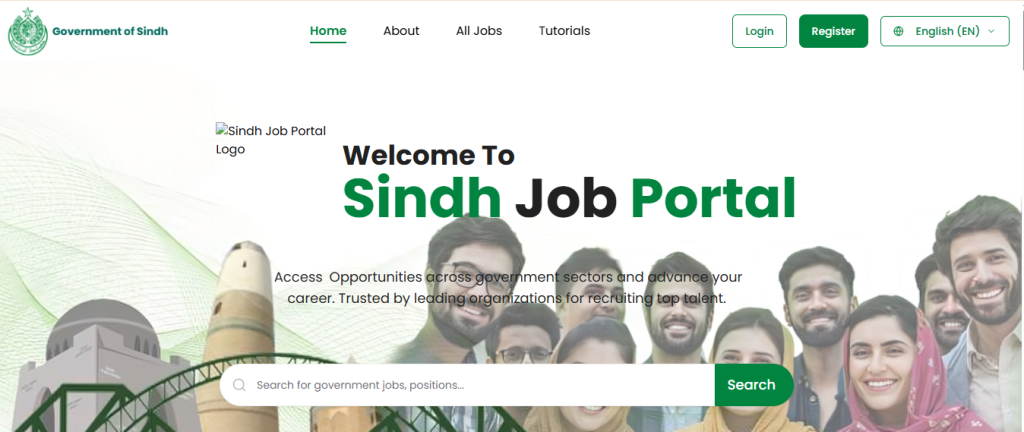
Step 1: Accessing the Portal
- Action: Open your web browser (Chrome, Firefox, etc.) and go to the official website: https://sjp.gos.pk.
- What to Expect: You will land on the portal’s homepage, which displays latest job advertisements and login options.
Step 2: The Registration Process
- Action: Click the “Register” or “Sign Up” button.
- What to Expect: A registration form will pop up. You must fill it out with accurate and verifiable information.
Here’s what you’ll need to fill in:
- CNIC Number: Enter without dashes (e.g., 1234512345671).
- Confirm CNIC: Re-enter your CNIC number.
- Email Address: Provide a valid and frequently used email address.
- Confirm Email: Re-enter your email address.
- Mobile Number: Provide an active Pakistani mobile number (e.g., 03XX1234567).
- Password: Create a strong password (mix of uppercase, lowercase, numbers, and symbols).
- Confirm Password: Re-enter your chosen password.

- Action: After filling the form, click “Register.” You will receive a verification code on your provided email and/or mobile number.
Step 3: Account Verification
- Action: Check your email inbox and SMS. Enter the verification code you receive into the prompt on the SJP website.
- What to Expect: Once the code is correctly entered, your account will be activated. You can now proceed to SJP Login.

Step 4: Completing Your Profile
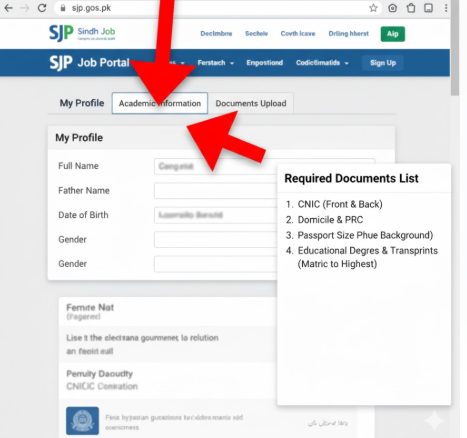
- Action: After your first login, you will be redirected to your personal dashboard. It is CRITICAL to complete your profile before applying for any job.
- What to Expect: The profile section will have multiple tabs. You will need to provide:
- Personal Information: Full name, Father’s name, Domicile (with district), etc.
- Contact Information: Permanent and mailing address.
- Academic Information: Details of your qualifications from Matric onward. You will need to enter degrees, majors, years, grades, and boards/universities.
- Experience Information: Details of any previous work experience.
- Documents Upload: You will be required to upload scanned copies of your:
- CNIC (Front & Back)
- Domicile Certificate
- Passport-sized photograph
- Educational Certificates (Matric, Intermediate, Graduation, etc.)
Step 5: Finding and Applying for a Job
- Action: Navigate to the “Jobs” or “Current Vacancies” section from your dashboard.
- What to Expect: You will see a list of all open positions. Use the search and filter bars effectively with the keywords we discussed:
- By Department: Search for “Health Department” or “School Education & Literacy Department.”
- By Job Title: Search for “Medical Officer,” “Junior Clerk,” or “Police Constable.”
- By BPS Scale: Filter for “BPS-14” or “BPS-16.”
- Action: Click on a job title to view the complete advertisement. Read it thoroughly! Note the eligibility criteria, required documents, and application deadline.

- Action: If you are eligible, click the “Apply Now” button. The system will auto-fill parts of the application form using your profile. Review all information carefully, as some fields might be job-specific. Submit the application.
- What to Expect: You will receive an on-screen confirmation and an application number. Save this number for future reference. Your application status will now be trackable from your dashboard (“My Applications” or “Application History”).
Sindh Job Portal: Understanding the Broader Ecosystem
While the Sindh Job Portal is the main platform, some prestigious positions are handled by other bodies. A savvy job seeker monitors all avenues.
- Sindh Public Service Commission (SPSC): For senior positions (typically BPS-17 and above), keep a close watch on the SPSC website. Search for “SPSC Advertisement,” “SPSC Syllabus” for preparation, and “SPSC Result” for outcomes.
- Sukkur IBA University Testing Services: Many mass-recruitment drives (like for Sindh Police or teaching roles) use Sukkur IBA for standardized testing. Be prepared for the STS Test (Screening Test System) if mentioned in the ad.
Don’t put all your eggs in one basket. Explore a wider range of opportunities across Pakistan on this dedicated page: Latest Jobs Advertisement in Pakistan.
SJP Job Categories: BPS-5 to BPS-15 Breakdown
Comprehensive BPS Scale Eligibility Guide
| BPS Category | Eligibility / Qualification | Common Positions |
|---|---|---|
| BPS-5 | Matriculation or equivalent | Naib Qasid, Driver, Class-IV Staff |
| BPS-6 | Matriculation or Intermediate | Junior Clerk, Data Entry Operator |
| BPS-7 | Matriculation or Intermediate | Assistant, Library Assistant |
| BPS-8 | Intermediate or Technical Diploma | Technical Assistant, Lab Assistant |
| BPS-9 | Intermediate | Store Keeper, Accountant |
| BPS-10 | Intermediate or Graduation | Statistical Assistant, Revenue Clerk |
| BPS-11 | Graduation | Junior Clerk, Accountant |
| BPS-12 | Graduation | Sub Engineer, Supervisor |
| BPS-13 | Graduation / Bachelor’s Degree | Assistant Director, Audit Officer |
| BPS-14 | Graduation / Bachelor’s Degree | Accounts Officer, Administrative Officer |
| BPS-15 | Graduation / Master’s Degree | Section Officer, Medical Officer |
Each applicant can filter jobs based on education, scale, location, and department using SJP Online Apply system.
Eligibility Criteria For SJP Jobs
Mandatory Requirements for Application
To successfully apply for Sindh Govt Jobs through the portal, candidates must meet these essential criteria:
- Citizenship: Must be a resident of Sindh Province with valid Domicile
- Age Limit: Typically 18 to 35 years, relaxable according to government policy
- Education: Minimum Matric to Master’s Degree as per BPS requirements
- Physical Fitness: Required for positions like Police Constable and ASI
Essential Documents for SJP Registration
- CNIC (Computerized National Identity Card) – Front and Back copies
- Domicile & PRC Form D – Must be from Sindh Province
- Educational Certificates – From Matric to highest degree
- Experience Letters – If applicable for the position
- Passport-size photographs – Recent white background
- Character Certificate – From last educational institution
Departments Offering Jobs via SJP 2025
Major Recruitment Departments on SJP
The following Sindh Government departments actively post job openings on SJP.gos.pk:
- Sindh Police Department – Police Constable, ASI, Head Constable
- Education & Literacy Department – Teacher, Lecturer, Subject Specialist
- Health Department Sindh – Medical Officer, Women Medical Officer, Pharmacist
- Finance & Revenue Department – Accounts Officer, Revenue Clerk
- Irrigation Department – Sub Engineer, Technical Staff
- Local Government & Housing – Municipal Officers, Town Planners
- Social Welfare & Women Development – Social Organizers, Community Workers
- Information Technology Department – IT Experts, Programmers
- Forest & Wildlife Department – Forest Guards, Wildlife Assistants
- Energy & Environment Department – Technical Staff, Environmental Specialists
Each department publishes its official job advertisements directly through the SJP portal.
Salary Structure and Benefits (BPS-5 to BPS-15)
Comprehensive Compensation Package
| BPS Scale | Approx. Monthly Salary (PKR) | Key Benefits |
|---|---|---|
| BPS-5 | 25,000 – 30,000 | Medical Allowance + Pension + Gratuity |
| BPS-7 | 30,000 – 35,000 | Annual Increments + House Rent Allowance |
| BPS-9 | 35,000 – 40,000 | Medical + Conveyance Allowance + Pension |
| BPS-11 | 40,000 – 50,000 | Gratuity & Medical + House Rent |
| BPS-14 | 50,000 – 60,000 | Leave Encashment + Travel Allowance |
| BPS-15 | 55,000 – 65,000 | Promotion Opportunities + Full Benefits |
Tentative Schedule for 2025 Recruitment
| Event | Action Required |
|---|---|
| Registration Start Date | SJP Registration and profile completion |
| Last Date to Apply | SJP Online Apply before deadline |
| Roll No Slip Issuance | Download Roll No Slip from dashboard |
| Written Test Date | Appear for Written Test / STS Test |
| Result Announcement | Check Shortlisted Candidate list |
| Final Merit List | Final Result and offer letters |
Note: Dates are tentative; always confirm via official www.sjp.gos.pk.
How to Track Your Application Status
Monitoring Your Application Journey
Once you’ve applied through SJP Online Apply system:
- Login to your SJP account regularly
- Open your Dashboard from main menu
- Check Application Status with color codes:
- Pending (Application under review)
- Shortlisted (Eligible for next stage)
- Selected (Congratulations! Final selection)
- Download your Roll No Slip and test details directly from portal
- Check for Interview Schedule updates
Key Features of Sindh Job Portal (SJP)
Why SJP is Your Best Choice for Government Jobs
- Unified Platform: One account for all Sindh Government Jobs
- Real-time Notifications: Live alerts for new vacancies matching your profile
- Smart Job Matching: Profile-based job suggestions using AI technology
- Transparent Process: Complete visibility into application status
- Test & Interview Updates: Direct communication about Written Test and interviews
- Secure Digital System: Managed by Sindh Government IT Cell with data protection
- Rural Access Friendly: Mobile-friendly design for candidates across Sindh
- Document Security: Encrypted storage of your CNIC, Domicile, and certificates
Additional Career Resources
Expand Your Opportunities
While focusing on SJP Jobs 2025, don’t miss other career opportunities:
- Latest Jobs Advertisement in Pakistan – Nationwide job updates
- Government Schemes in Pakistan – Social welfare programs
- Apply Online for Scholarships – Educational funding opportunities
Sindh Job Portal Contact Information
| Contact Method | Details |
|---|---|
| Official Email | support@sjp.gos.pk |
| Helpline Number | +92 123 456 7890 |
| Office Address | Sindh Job Portal Office, Sukkur, Pakistan |
| Website | www.sjp.gos.pk |
| Working Hours | 9:00 AM to 5:00 PM (Monday to Friday) |
Frequently Asked Questions (FAQs)
I forgot my password for SJP Login. What should I do?
On the login page, click the “Forgot Password” link. You will be asked to provide the email address or CNIC associated with your account. A password reset link will be sent to your registered email.
Can I edit my application after submitting it?
Generally, you cannot edit an application once it’s submitted. However, you can often update your master profile, which may be reflected in future applications. Always double-check everything before hitting the final submit button.
I am facing a technical error/glitch on the portal. Who should I contact?
The SJP portal has a “Help” or “Contact Us” section, usually providing an email address (e.g., helpdesk@sjp.gos.pk) or a helpline number. Report the issue there with relevant screenshots.
Are all Sindh Government Jobs posted on SJP?
While the vast majority are, some specialized or very senior posts may be advertised directly on department websites or through the SPSC. It’s best to check multiple sources.
What documents do I need for the interview if I am shortlisted?
You will need to bring all original documents that you uploaded during the application process: CNIC, Domicile, all educational certificates and transcripts, experience letters, and a printed copy of your application and roll no slip.